Netscape Mail
Your welcome letter provides all the information you need to set up your e-mail account. It should have your User ID, E-Mail Address and POP Server.
For example: ABC Company will use the following information to set-up its e-mail account:
User ID
E-Mail Address
POP Server
abc
abc@asiansources.com
mail.asiansources.com
How to setup abc@asiansources.com
Step 1.
Open Netscape Navigator. To go to Netscape Mail, click on the Window menu and choose Netscape Mail.
Step 2.
From the Options menu, choose Mail and News Preferences.
Step 3.
Click on the Servers tab.
Step 4.
Click on the following boxes and type in the information shown below, exactly as it appears.
Your user name is the name before the "@" symbol in your e-mail address.
Step 5.
Click on the Identity tab.
Step 6.
Fill out the following boxes with the information provided below:



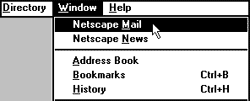 Open Netscape Navigator. To go to Netscape Mail, click on the Window menu and choose Netscape Mail.
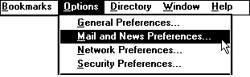 From the Options menu, choose Mail and News Preferences.
 Click on the Servers tab.

